
Getting reliable, machine-readable JSON from LLMs for your production workflows
If you’ve ever integrated a Large Language Model (LLM) into a production application, you’ve probably hit a frustrating wall: when a human reads an LLM’s response, a bit of extra prose or Markdown formatting is no big deal. We just skim past it. But when your code needs to consume that response programmatically, you need something predictable and machine-parseable, typically valid JSON. And instead of clean JSON, you get… mostly JSON, sometimes wrapped in Markdown, occasionally with a friendly preamble like “Sure! Here’s the JSON you requested:”.
It works 95% of the time. But that remaining 5%? That’s production incidents waiting to happen.
In this article, we’re going to take a deep dive into Amazon Bedrock’s Structured Outputs feature, a capability that fundamentally changes how you get reliable, schema-compliant JSON from foundation models. We’ll cover why this matters, how it works under the hood (in a way that’s accessible even if you’re not an ML engineer), best practices for designing your schemas, and some gotchas we’ve learned from real-world projects.
Whether you’re a developer building AI-powered workflows or a technical leader evaluating how to bring LLMs into your architecture, this article will give you the understanding you need to make informed decisions.
TL;DR — Amazon Bedrock Structured Outputs let you get guaranteed, schema-compliant JSON from foundation models:
- Define your expected output shape as a JSON Schema (Draft 2020-12).
- Bedrock uses constrained decoding to enforce the schema during token generation, not after the fact.
- Works through the Converse API with Claude, Nova, Llama, and other supported models.
- No more regex hacks, complex bracket matching parsing logic, retry logic, or validation layers: the response is always valid JSON.
A quick primer on Amazon Bedrock

Before we get into structured outputs, let’s briefly set the scene. If you’re already familiar with Amazon Bedrock, feel free to skip ahead.
Amazon Bedrock is a fully managed service from AWS that gives you access to a range of foundation models from leading AI companies (including Anthropic’s Claude, Meta’s Llama, Amazon’s own Nova models, and others) through a unified API. Think of it as an abstraction layer: instead of integrating directly with each model provider’s API (OpenAI, Anthropic, Cohere, etc.), you get a single, consistent interface for all of them.
But Bedrock isn’t just a convenience wrapper. It gives you enterprise-grade features that matter in production environments:
- IAM integration: control who can invoke which models using the same AWS permissions model you already know.
- CloudTrail logging: audit every model invocation for compliance.
- VPC endpoints: your requests never leave your VPC, which is critical if you need strict data residency or compliance controls.
- Encryption: data encrypted at rest and in transit, using your own keys if you want.
- Model switching: swap between different models and providers without rewriting your application code.
- Data privacy: AWS guarantees that your inputs and outputs are never used for model training, a common (and legitimate) concern when sending sensitive data to third-party AI APIs.
When to use Bedrock vs. going direct to a provider
This is a question we get a lot at fourTheorem, and the honest answer is: it depends.
Bedrock makes the most sense when you’re already invested in the AWS ecosystem and want tight integration with your existing infrastructure. If you need enterprise governance, compliance controls, or the ability to switch between models easily without re-plumbing authentication and infrastructure, Bedrock is the natural choice. It’s also the way to go if you want access to Bedrock-specific features like Knowledge Bases, Guardrails, and Agents.
Going directly to a provider can make sense when you’re in the prototyping phase and want the fastest path to a working demo, or when you need access to the absolute latest model versions (providers sometimes ship updates to their own API before Bedrock catches up), or when you need provider-specific features not yet exposed through Bedrock.
It’s also worth noting that not all leading models are available through Bedrock. Due to commercial and competitive reasons, models like Google’s Gemini and OpenAI’s GPT-5 are not on the platform. If you specifically need those models, you’ll have to go directly to the provider. Bedrock’s model roster is growing, but it’s not exhaustive.
In practice, many teams that we work with take a hybrid approach: they use the direct APIs for experimentation and rapid prototyping, then move to Bedrock for production workloads where governance, integration, and reliability are paramount. This is a perfectly sensible strategy.
The problem: getting structured data from a text generator

Now, let’s talk about the core problem that structured outputs solve.
At a fundamental level, LLMs are text generators. They produce sequences of tokens (words, parts of words, punctuation) based on probability distributions. When you have a conversation with an LLM, it generates each word one at a time, choosing the most likely continuation given everything that came before it. This is why they’re so good at producing natural, fluent language.
But here’s the tension: our applications don’t need prose. They need (good) data. Specifically, they need structured, parseable data that downstream code can consume programmatically.
A motivating example
Let’s say you’re building a customer support ticket classifier. You want the LLM to read a customer email and return something like:
{
  "category": "billing",
  "priority": "high",
  "summary": "Customer charged twice for monthly subscription",
  "requires_human_review": true
}
Simple enough, right? You craft a prompt that says “Respond in JSON format with the following fields…” and it works… Most of the time! But most of the time isn’t good enough when this is part of a critical workflow. You need that JSON to be valid and parseable every single time, because your code is going to do things like JSON.parse(response) and then act on the resulting object. If the response isn’t valid JSON, your code breaks.
And every developer and architect’s dream is to see the least amount of production failures.
So, in order to fully understand why you can expect errors, let’s have a practical look at the kinds of things that go wrong.
Failure mode 1: Markdown wrapping
You ask for JSON, and the model helpfully wraps it in Markdown code fences:
```json
{
  "category": "billing",
  "priority": "high",
  "summary": "Customer charged twice for monthly subscription",
  "requires_human_review": true
}
```
Your JSON.parse() call explodes because it’s not pure JSON. There’s Markdown syntax around it. Now you need to write code to strip those fences before parsing.
Failure mode 2: Conversational preambles
The model adds a friendly introduction:
Sure! Based on my analysis of the customer email, here's the structured classification:

{
  "category": "billing",
  "priority": "high",
  "summary": "Customer charged twice for monthly subscription",
  "requires_human_review": true
}
Again, not valid JSON. Your parser chokes on “Sure! Based on my analysis…”.
Failure mode 3: Schema drift
The model mostly follows your schema but makes “creative” decisions:
- Uses
"Priority": "High"instead of"priority": "high"(casing mismatch). - Invents an extra field like
"confidence": 0.95that you didn’t ask for. - Omits
requires_human_reviewbecause the model decided it wasn’t applicable. - Returns
"priority": "medium-high"instead of one of your expected values.
Your code expects a specific shape, and any deviation can cause subtle bugs or outright crashes.
Failure mode 4: Invalid JSON syntax
Sometimes the model produces something that looks like JSON but isn’t technically valid:
{
  "category": "billing",
  "summary": "Customer says "I was charged twice"",
  "priority": "high",
}
Spot the problems? The double quotes inside the summary value aren’t escaped, and there’s a trailing comma after the last property. Both are invalid JSON, and both are mistakes LLMs make because they generate text token by token without a concept of “valid syntax.”
Failure mode 5: Multiple JSON blocks
Sometimes the model “second-guesses” itself and produces two (or more) JSON objects in a single response:
Sometimes the model “second-guesses” itself and produces two (or more) JSON objects in a single response:
Here's my initial classification:

{
  "category": "billing",
  "priority": "medium",
  "summary": "Duplicate charge on subscription"
}

Actually, given the urgency of the customer's language, let me revise:

{
  "category": "billing",
  "priority": "high",
  "summary": "Customer charged twice for monthly subscription",
  "requires_human_review": true
}
Now your bracket-matching logic finds the first { and its matching }, but that’s the wrong JSON block. The “refined” version at the bottom is the one the model intended as the final answer. Which one do you trust? Do you always take the last one? What if there are three? This kind of ambiguity is a nightmare for production parsers.
The workaround circus
When you encounter these issues, the natural response is to build workarounds. And teams do. We’ve seen (and built) all of them:
- Regex-based fence stripping: write regular expressions to detect and remove Markdown code fences. But what if the model uses a different fence style? Or nests them?
- Bracket matching: scan the response for the first
{and try to find its matching}. This gets complicated fast if there are nested objects, and it falls apart if the model produces two JSON blocks (for example, giving a first attempt and then a “refined” version). - Retry logic: if parsing fails, send the request again and hope the model cooperates this time. This adds latency, cost, and unpredictability.
- Prompt hardening: add more and more instructions to your prompt: “Return ONLY valid JSON. Do NOT include any other text. Do NOT use Markdown formatting.” This helps, but it’s a probabilistic improvement, not a guarantee.
- Validation layers: even if parsing succeeds, add schema validation to check field types, required properties, and enum values. Then add fallback logic for when validation fails.
This is a lot of engineering effort for something that should be simple: “give me a JSON object matching this shape.” And the result is still probabilistic: you’re reducing the failure rate, not eliminating it.
This is the fundamental tension: LLMs are probabilistic text generators, but our downstream code needs deterministic, schema-compliant data structures.
Enter Bedrock Structured Outputs

Amazon Bedrock’s Structured Outputs feature solves this problem in a fundamentally different way from all those workarounds we just described. And the difference is important to understand, because it’s not just a nicer parsing layer. It operates at a completely different level.
Structured Outputs became generally available in February 2026 for Claude 4.5+ models and select open-weight models. At the time of writing, this is a brand-new feature, so expect the list of supported models and schema capabilities to expand over the coming months. For the official (and most up-to-date) documentation, see Structured Output in Amazon Bedrock.
What it does
When you use structured outputs, you pass a JSON Schema alongside your prompt. Bedrock then guarantees that the model’s response will be valid, parseable JSON conforming to that schema. Every single time. Of course there are caveats and edge cases that we’ll cover later, but the point is that structured outputs give you a level of reliability and predictability that was simply not possible before.
No Markdown fences. No preambles. No missing fields. No invented fields. No invalid syntax.
How it works (and why it matters)
Here’s where it gets genuinely interesting. Bedrock’s structured outputs don’t work by generating a free-text response and then parsing or validating it after the fact (as you could do yourself with some clever engineering). Instead, Bedrock intervenes in the token generation process itself, the mechanism by which the model produces text one token at a time.
To understand this, let’s briefly look at how LLMs generate text.
A simplified view of LLM text generation
Imagine the model is writing a response, one token at a time. Note that a each model has a different way of tokenizing text, but for simplicity imagine a token is roughly a word, a fraction of a long word, or a punctuation character. At each step, the model considers everything it has generated so far and produces a probability distribution over its entire vocabulary (let’s say 100,000 possible tokens). Each token gets a score (called a logit) representing how likely the model thinks it should come next. These scores are converted into probabilities, and the model picks one, usually the most probable, or a random sample weighted by probability.
For example, if the model has generated {"category": " so far, it might assign high probability to tokens like billing, technical, shipping and very low probability to tokens like elephant, 42, or a closing brace }.
Under normal circumstances, the model is free to pick any token from its vocabulary. This is great for natural language conversation but risky for structured data.
Constrained decoding: the key innovation
Constrained decoding adds an extra step to this process. Before the model makes its choice, Bedrock introduces a filter that masks out tokens that would violate the schema. The model can literally only choose from tokens that keep the output on a valid path toward schema-compliant JSON.
Think of it like a GPS that only shows you routes that lead to your destination. You still get to choose which route to take (the model still uses its training to pick the best tokens), but every option the GPS offers is guaranteed to get you there. It simply won’t suggest a route that drives you off a cliff.
Here’s a concrete example of how this plays out step by step:
- The model needs to start its response. The schema says the output must be a JSON object, so the only valid first token is
{. Every other token in the vocabulary gets its probability set to zero. The model “chooses”{. - The model just produced
{. The schema has a required field"category". The only valid continuation is the opening quote of a property name. Again, the model has no choice but to produce"category". - Now the model is generating the value for
category, which is defined as an enum with values["billing", "technical", "shipping", "other"]. Only tokens that form the beginning of one of these values are allowed. The model can’t output"medium-high" or "BILLING"or any other creative interpretation. It can only produce one of the four defined values. - This continues token by token until the entire object is complete. At every step, only tokens that maintain schema compliance are available.
The result is that every response is guaranteed to be valid, parseable JSON matching your schema. Not “usually valid.” Not “valid after retry.” Guaranteed.
Why you can’t replicate this yourself
This is an important point, especially if you’re evaluating whether to build your own solution versus using Bedrock. Constrained decoding requires access to the token generation process inside the model inference engine. It’s not something you can implement as a post-processing step on top of an API that only gives you the final text response.
When you use a model through a standard API (whether it’s OpenAI’s, Anthropic’s, or anyone else’s), you send a prompt and get back text. You have no access to the internal logit scores, no ability to mask tokens, and no way to constrain the generation process. All you can do is try to parse what comes back and hope it’s correct.
Bedrock has this capability because it manages the model hosting infrastructure. It can inject the schema constraints directly into the inference pipeline, modifying the token selection process in real time. This is a level of integration that’s simply not available to you as an API consumer.
The schema compilation step
There’s another technical detail worth understanding: before Bedrock can constrain the model’s output, it needs to compile your JSON Schema into a grammar, an internal representation that can be efficiently evaluated at each token generation step.
This compilation happens the first time you use a particular schema, and it can take anywhere from a few seconds to a couple of minutes depending on schema complexity. But here’s the good news: compiled grammars are cached for 24 hours per AWS account. So the first request might have slightly higher latency, but all subsequent requests with the same schema are fast.
This also means you should design your application to reuse schemas across requests. If you’re making the same type of classification call thousands of times a day, the schema only compiles once, and every subsequent call benefits from the cache.
One particularly nice detail: changing the description fields in your schema (which, as we’ll see later, act as inline instructions to the model) does not invalidate the grammar cache. So you can iterate on the wording of your descriptions to improve output quality without triggering recompilation. Only structural changes to the schema (new fields, different types, changed enums) invalidate the cache.
Introduction to JSON Schema
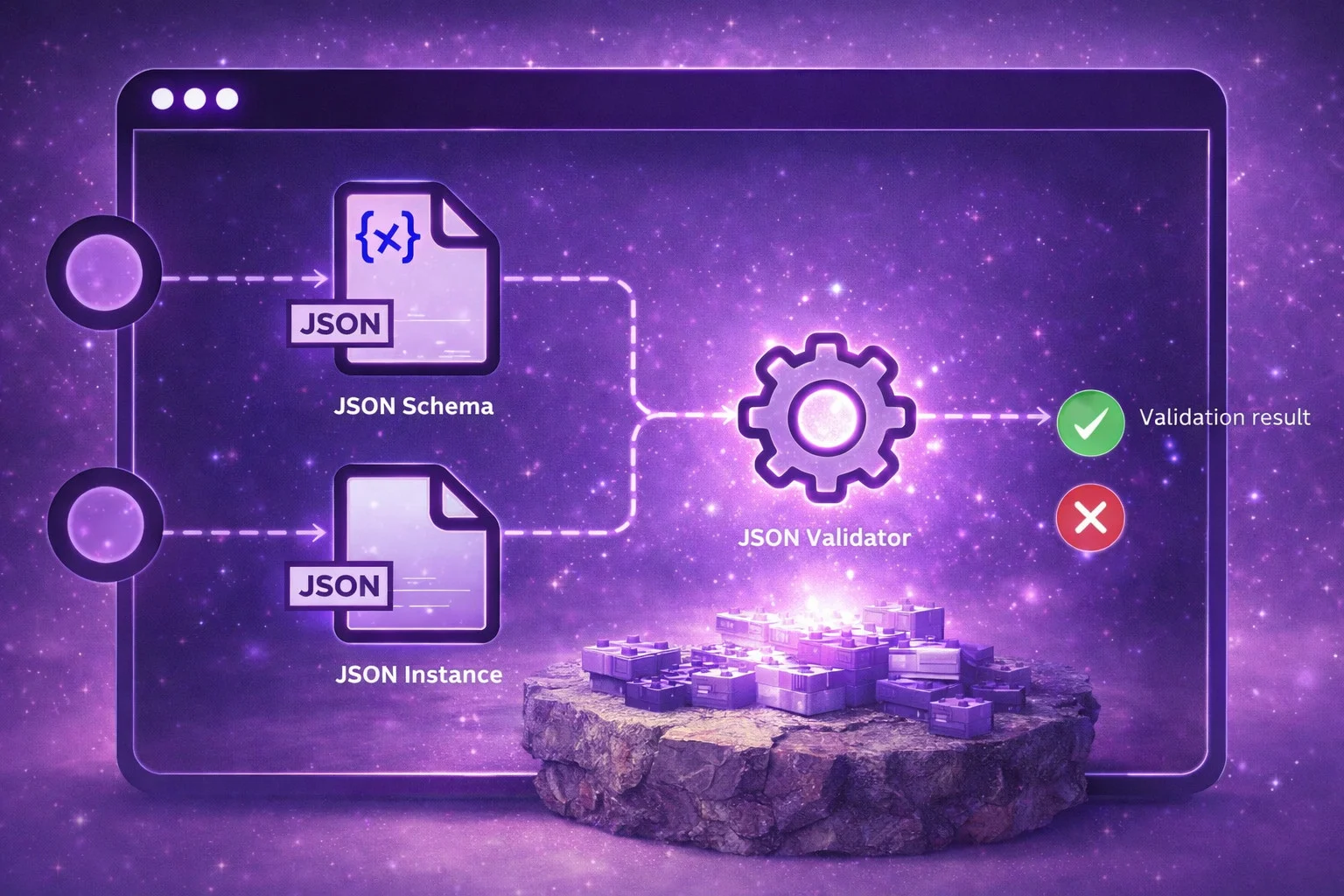
Since JSON Schema is the language you use to tell Bedrock what structure you want, let’s make sure we’re on the same page about how it works.
JSON Schema is a standard specification (Bedrock supports Draft 2020-12) for describing the structure of JSON data. If you’ve ever defined types in TypeScript, interfaces in Java, or models in Pydantic, the concept is similar: you’re declaring what shape your data should have.
A basic example
Here’s a simple JSON Schema describing a customer support ticket classification:
{
  "type": "object",
  "properties": {
    "category": {
      "type": "string",
      "enum": ["billing", "technical", "shipping", "account", "other"],
      "description": "The primary category of the customer issue"
    },
    "priority": {
      "type": "string",
      "enum": ["low", "medium", "high", "critical"],
      "description": "Urgency level: low=general inquiry, medium=service degraded, high=service broken, critical=data loss or outage"
    },
    "summary": {
      "type": "string",
      "description": "A one-sentence summary of the customer's issue, maximum 20 words"
    },
    "requires_human_review": {
      "type": "boolean",
      "description": "True if the issue is complex, sensitive, or involves a potential escalation"
    }
  },
  "required": ["category", "priority", "summary", "requires_human_review"],
  "additionalProperties": false
}
Yes, you’re reading that correctly: it’s JSON that describes the structure of… JSON. A bit meta, but it works surprisingly well.
Let’s break down the key parts:
"type": "object"says the top-level value is a JSON object (the{...}structure)."properties"lists each field and its type. You can have strings, numbers, integers, booleans, arrays, and nested objects."enum"restricts a string to one of a predefined set of values. The model literally cannot produce anything outside this list."description"provides human-readable (and model-readable!) descriptions for each field. As we’ll see, these are critically important."required"lists all fields that must be present."additionalProperties": falsetells the schema (and Bedrock) that no extra fields beyond those listed are allowed.
What Bedrock supports (and doesn’t)
Here’s something important to know: Bedrock supports a subset of the full JSON Schema specification. This isn’t arbitrary. It’s a direct consequence of the constrained decoding approach. Remember, your schema gets compiled into a grammar that constrains token generation in real time. Some JSON Schema features would create grammars that are too complex or ambiguous to evaluate efficiently.
| Feature | Supported | Notes |
|---|---|---|
Basic types (object, array, string, integer, number, boolean, null) | Yes | |
enum | Yes | Restricts values to a defined set |
required | Yes | |
description | Yes | Acts as inline instructions for the model |
additionalProperties: false | Yes | Mandatory on every object (more below) |
Nullable types ("type": ["string", "null"]) | Yes | |
Nested objects and arrays with items | Yes | |
const | Yes | Fixes a field to a single value |
Internal $refvia $defs/definitions | Yes | External $ref URIs are not supported |
| Recursive schemas | No | An object can’t reference itself |
minimum, maximum | No | Numerical constraints not enforced |
minLength, maxLength | No | String length constraints not enforced |
anyOf/ oneOf | Limited | Can cause grammar compilation complexity; prefer nullable types |
if / then / else | No | Conditional schemas not supported |
Tip: If you use an unsupported schema feature, Bedrock returns a validation error (HTTP 400) at request time rather than silently misbehaving, so you’ll know immediately. Since this is a runtime error, it’s good practice to send a test request to Bedrock with every new or modified schema before shipping it to production. This way you can verify that the schema is accepted and compiles correctly.
The mandatory additionalProperties: false rule
This is a critical requirement that trips people up: you must set "additionalProperties": false on every object type in your schema, including nested objects. Without it, structured outputs won’t work.
Why? Because additionalProperties: true (the default in JSON Schema) means the model could add any number of arbitrary fields with any names and types. This creates an essentially infinite number of valid output paths, which can’t be compiled into an efficient grammar. By requiring additionalProperties: false, Bedrock knows exactly which fields can appear and can build tight constraints.
Using structured outputs with the Bedrock Converse API
Here’s what a call looks like using the Bedrock Converse API with structured outputs:
import {
  BedrockRuntimeClient,
  ConverseCommand,
} from '@aws-sdk/client-bedrock-runtime'

// 1. Create the Bedrock Runtime client
const client = new BedrockRuntimeClient({ region: 'eu-west-1' })

// 2. Define the JSON Schema that describes the expected output
const schema = {
  type: 'object',
  properties: {
    category: {
      type: 'string',
      enum: ['billing', 'technical', 'shipping', 'account', 'other'],
      description: 'The primary category of the customer issue',
    },
    priority: {
      type: 'string',
      enum: ['low', 'medium', 'high', 'critical'],
      description:
        'low=general inquiry, medium=degraded, high=broken, critical=data loss',
    },
    summary: {
      type: 'string',
      description: 'One-sentence summary of the issue, max 20 words',
    },
    requires_human_review: {
      type: 'boolean',
      description: 'True if complex, sensitive, or potential escalation',
    },
  },
  required: ['category', 'priority', 'summary', 'requires_human_review'],
  additionalProperties: false,
}

// 3. Send the request using the Converse API with structured output config
const response = await client.send(
  new ConverseCommand({
    modelId: 'eu.anthropic.claude-sonnet-4-6',
    messages: [
      {
        role: 'user',
        content: [
          {
            text: "Classify this support ticket: 'I was charged $49.99 twice on my credit card for the same monthly subscription. Please refund the duplicate charge immediately.'",
          },
        ],
      },
    ],
    inferenceConfig: { maxTokens: 512 },
    // This is the key part: outputConfig tells Bedrock to constrain
    // the model's response to match our JSON Schema
    outputConfig: {
      textFormat: {
        type: 'json_schema',
        structure: {
          jsonSchema: {
            schema: JSON.stringify(schema),
            name: 'ticket_classification',
            description: 'Customer support ticket classification schema',
          },
        },
      },
    },
  }),
)

// 4. Parse the response — guaranteed to be valid JSON matching our schema
const text = response.output?.message?.content?.[0]?.text ?? '{}'
const result = JSON.parse(text)
console.log(result)
// {"category": "billing", "priority": "high", "summary": "Customer charged twice for monthly subscription, requesting refund", "requires_human_review": false}
Let’s walk through the key steps:
- Create the client: we use
BedrockRuntimeClientfrom the AWS SDK for JavaScript v3, pointing to the region where our model is available. - Define the schema: this is a plain JSON Schema object describing the shape of the output we want. Note
additionalProperties: false, which is mandatory. - Send the request: the
ConverseCommandtakes our prompt inmessagesand, crucially, theoutputConfig.textFormatblock that tells Bedrock to enforce our schema during generation. The schema is passed as a JSON string viaJSON.stringify. - Parse the response: because Bedrock guarantees the response conforms to our schema, we can call
JSON.parsewith confidence. Notry/catchneeded, no regex to strip Markdown, no schema validation layer, no retry logic.
Best practices for JSON Schema design
Here’s where things get really interesting. Your JSON Schema isn’t just a structural contract. It’s effectively a prompt that directly influences output quality. The field names, descriptions, ordering, and enum values all influence how the model generates its response. Get the schema design right and you get reliably excellent outputs. Get it wrong and you get structurally valid garbage: the JSON is always valid, but the data inside might be nonsensical.
Let’s look at the practices that make the biggest difference.
Use descriptive field names
Remember that LLMs generate tokens sequentially. When the model writes "customer_full_name":, that string becomes context influencing the next token. The model has been trained on billions of documents. It knows what customer_full_name should contain. It has far less idea what cust_nm means.
| Instead of this… | Use this |
|---|---|
pn | product_name |
rat | rating_out_of_five |
cat | product_category |
desc | issue_description |
ts | created_timestamp |
This isn’t just a code readability issue. Descriptive field names act as implicit instructions that guide the model toward the right kind of content.
Use description fields as micro-prompts
In standard JSON Schema usage (e.g. for request validation in an API), the description field is optional and typically ignored by validators. It’s just documentation for human developers. But in the context of Bedrock structured outputs, description is sent to the model as input context and functions as an inline instruction. This makes it one of the most powerful and underused features of structured outputs: it’s effectively part of your prompt.
Consider the difference, building on our support ticket example:
{
  "priority": {
    "type": "string",
    "enum": ["low", "medium", "high", "critical"]
  }
}
versus:
{
  "priority": {
    "type": "string",
    "enum": ["low", "medium", "high", "critical"],
    "description": "low=general inquiry or feature request, medium=service degraded but customer can still use the product, high=core functionality broken and no workaround available, critical=data loss, security breach, or complete service outage"
  }
}
The first version leaves the model guessing about what distinguishes “medium” from “high” in your business context. Is a slow dashboard “medium” or “high”? Without guidance, the model has to guess. The second version encodes your exact business definitions directly into the schema, and the model will use these definitions when making its classification.
You can also use descriptions to give formatting instructions:
{
  "summary": {
    "type": "string",
    "description": "One-sentence summary of the problem, maximum 20 words, no jargon"
  }
}
Bedrock’s constrained decoding can’t mechanically enforce word counts (that would require a different kind of constraint), but the model will treat the description as an instruction and generally follow it. And remember, changing descriptions doesn’t invalidate the grammar cache, so you can iterate on wording freely.
Put reasoning before conclusions (field ordering matters!)
This is probably the most underappreciated principle in schema design, and it’s the single biggest lever for output quality.
LLMs generate fields sequentially, in the order they appear in the schema. This means the order of fields determines the order the model thinks about them. If you put the answer before the reasoning, the model commits to a conclusion before it has thought through the evidence. Any subsequent “reasoning” field becomes post-hoc justification rather than genuine analysis.
Bad ordering (conclusion first):
{
  "properties": {
    "is_fraudulent": { "type": "boolean" },
    "confidence": { "type": "number" },
    "risk_indicators": { "type": "array", "items": { "type": "string" } },
    "analysis": { "type": "string" }
  }
}
Here the model decides is_fraudulent: true first, then generates risk_indicators and analysis to justify a decision it already made. This is like writing your conclusion before doing the research.
Good ordering (reasoning first):
{
  "properties": {
    "risk_indicators": {
      "type": "array",
      "items": { "type": "string" },
      "description": "List all suspicious patterns found in the transaction"
    },
    "analysis": {
      "type": "string",
      "description": "Detailed reasoning weighing the risk indicators, 2-3 sentences"
    },
    "is_fraudulent": {
      "type": "boolean",
      "description": "Final determination based on the above analysis"
    },
    "confidence": {
      "type": "number",
      "description": "Confidence score from 0.0 to 1.0 based on strength of evidence"
    }
  }
}
Now the model identifies indicators first, reasons through them, and then makes its decision. The analysis actually influences the conclusion because it’s generated first. This is a form of chain-of-thought reasoning embedded directly in your schema structure.
Use enums wherever possible
Enums are doubly powerful because they constrain outputs both mechanically (the model literally cannot produce tokens outside the set) and semantically (they tell the model what categories exist in your domain).
Without enums on a sentiment field, you might get any of: "positive", "Positive", "POSITIVE", "mostly positive", "good", "favorable". With an enum, you get exactly one of your defined values, every single time.
A few guidelines for designing enums:
- Use human-readable values:
"positive"not"pos","high_priority"not"hp". The model understands them better. - Always include a fallback: add an
"other"or"unknown"value for cases that don’t fit neatly. Without it, the model is forced to shoehorn edge cases into categories where they don’t belong. - Define meanings in descriptions: don’t assume the model shares your understanding of what each value means. Be explicit.
Handle missing data with nullable types, not optional fields
This is a subtle but important pattern. If a field is required (and all your fields should be, for structured outputs) but the source data doesn’t contain the relevant information, the model has two choices: leave the field empty (which violates the schema if the type is string) or hallucinate a plausible-looking value.
Hallucination is the worst outcome. The model might confidently fill in "company_name": "Acme Corp" when the source data (prompt and optional attachments) never mentioned any company at all.
The solution is to use nullable types:
{
  "company_name": {
    "type": ["string", "null"],
    "description": "Company name if mentioned in the text, null otherwise"
  }
}
Keep the field required (Bedrock expects this), but make the type nullable. The description reinforces when null is the appropriate response. This gives the model a legitimate way to say “this information isn’t present” without hallucinating.
The schema complexity gotcha: keep it simple
This is something we’ve learned the hard way in our projects, and it’s worth calling out explicitly because the documentation doesn’t emphasize it enough.
Remember that Bedrock compiles your JSON Schema into a grammar for constrained decoding. This compilation step is where things can go wrong if your schema is too complex.
The “Grammar compilation timed out” error
If your schema exceeds a certain complexity threshold, Bedrock’s compiler can’t process it in time and you’ll get an error along the lines of "Grammar compilation timed out". This is a frustrating error because it’s somewhat opaque and doesn’t tell you what about your schema is too complex.
What causes complexity explosions
The main culprits are:
- Too many
anyOf/oneOfconstructs: every union type multiplies the number of paths the grammar compiler needs to evaluate. A schema with 10 optional fields, each usinganyOf, can create an exponential explosion in the compiled grammar size. - Deeply nested optional fields: each level of optionality creates branching paths.
- Complex conditional schemas:
if/then/elsestructures (even where partially supported) add significant complexity. - The combination of these: nesting unions inside optionals inside conditionals can create combinatorial explosion.
A real-world example: schema generation libraries
If you’re using TypeScript, you might be generating JSON Schemas from your types using libraries like Zod or TypeBox. Both produce perfectly valid JSON Schema, but the output often contains constructs that Bedrock struggles with.
For example, TypeScript optional properties (property?: string) get compiled to anyOf: [{ "type": "string" }, { "type": "null" }] or similar union constructs. A schema with 15 optional fields generates 15 anyOf constructs, which can push the grammar compilation beyond its limits.
If you’re using these libraries, you have a few options:
- Post-process the generated schema: write code that reshapes the output, replacing
anyOfunions with nullable types before passing the schema to Bedrock. - Craft JSON Schemas by hand: this gives you full control over the structure and complexity, but you lose the benefits of type inference and automatic schema generation from your code.
- Use library-level escape hatches: for example, TypeBox offers
Type.Unsafe(), which lets you define the exact JSON Schema output for a given type while keeping TypeScript type inference. It can be tricky to get right, but it gives you the best of both worlds: code-level type safety and controlled JSON Schema generation.
We haven’t found a single perfect approach. In our projects, TypeBox with Type.Unsafe() for edge cases has been the most practical middle ground. For more complex schemas, we’ve written post-processing code that reshapes the generated output and replaces anyOf with nullable types.
What works best in practice: flat structures with nullable fields
Instead of deeply nested objects with optional sub-structures, use a flat object where fields that might not apply are typed as nullable ("type": ["string", "null"]).
If you come from a TypeScript (or Rust, or Haskell) background, this might feel like a step backwards. Ideally, we like to write code with strict, expressive types. For instance, we love using discriminated unions (or tagged unions) to represent mutually exclusive shapes of data. A PaymentMethod type might be either CreditCard (with card number, expiry, CVV) or PayPal (with email), each variant with its own specific fields. This pattern is excellent for application code, but it maps to oneOf in JSON Schema, which is exactly the kind of construct that causes grammar compilation to blow up.
So there’s a tension: the type-system patterns we reach for instinctively don’t always map cleanly to what Bedrock’s compiler can handle. The pragmatic approach is to optimise your Bedrock-facing schema for the LLM and its compiler, not for type-system elegance.
That said, this principle only applies to the layer of your code that interacts with Bedrock. You should still use rich, expressive types in the rest of your application. The trick is to have a translation layer that maps your internal types into the flatter, nullable-field style that Bedrock can handle. This way you get the best of both worlds: strict types for your application logic and compatible schemas for Bedrock.
General rule of thumb
If you hit "Grammar compilation timed out":
- Flatten nested structures
- Replace
anyOf/oneOfwith nullable types - Reduce the number of optional fields
- Test incrementally: add fields one at a time until you find the threshold
Things that will still break you (even with structured outputs)
Structured outputs are tremendously powerful, but they’re not magic. There are three scenarios where you can still get unexpected results:
1. Token limit truncation
If maxTokens is set too low, the model might run out of tokens before completing the JSON structure. The response gets cut off mid-object, producing malformed JSON.
The fix: always check the stopReason in the response. If it’s "max_tokens", your output is likely truncated and shouldn’t be trusted. Set maxTokens generously. It’s better to have unused headroom than truncated output.
2. Safety refusals
If the model declines to respond due to content safety policies, it will produce a non-conforming response regardless of the schema. This is by design: safety guardrails take precedence over structural constraints.
The fix: handle this case explicitly in your code. Check for safety-related stop reasons and have a fallback path.
3. Structurally valid but semantically wrong
Constrained decoding guarantees the shape of the output, not the content. The model can still produce a perfectly valid JSON object where the values are nonsensical, irrelevant, or hallucinated.
The fix: this is where all the schema design best practices we discussed (descriptive names, detailed descriptions, reasoning-first field ordering, enums) do their heavy lifting. A well-designed schema is your best defense against structurally valid garbage. For business-critical outputs, consider adding a validation layer that checks semantic correctness (e.g., does the confidence score make sense given the analysis?). If you’re already using libraries like Zod or TypeBox to generate your JSON Schemas, you can reuse those same schemas for runtime validation in your application code. This gives you a final safety net that checks not just the structure but also the content of the model’s response against your business rules before accepting it as valid.
Practical considerations for production
The following tips apply to any LLM integration on Bedrock, not just structured outputs. But they’re worth keeping in mind as you build production workflows around structured output calls.
Latency
LLM inference is inherently slower than traditional API calls. Expect hundreds of milliseconds to seconds for a response. For user-facing applications, use streaming (ConverseStream API) to dramatically improve perceived performance. Users see the response building up token by token rather than waiting for the entire thing.
Also, remember that the first request with a new schema will be slower due to grammar compilation. Design your system to “warm up” schemas if latency on the first call matters.
Cost
Token usage can creep up fast, especially with large system prompts repeated on every call, agentic loops with tool-calling, and RAG pipelines that stuff large chunks of context into every prompt. Monitor your token usage closely using CloudWatch metrics and set billing alarms.
A cost-effective strategy is to use different models for different tasks: a lightweight model like Amazon Nova Lite or Claude Haiku for simple classifications, and a more capable model like Claude Sonnet for complex reasoning tasks.
Determinism
LLMs are inherently non-deterministic. The same input can produce different output across invocations. Setting temperature: 0 helps but doesn’t guarantee identical outputs. This matters for testing, debugging, and compliance scenarios. Design your tests to validate the shape and reasonable range of outputs rather than expecting exact reproducibility.
Wrapping up
Structured outputs represent a genuine leap forward in how we integrate LLMs into production applications. By moving the constraint enforcement from the application layer (regex hacks, retry logic, validation layers) into the inference engine itself (constrained decoding, grammar compilation), Bedrock eliminates an entire class of reliability problems.
Here are the key takeaways:
- Structured outputs guarantee schema-compliant JSON by constraining the token generation process, not by parsing after the fact.
- Your JSON Schema is a prompt: field names, descriptions, ordering, and enums all directly influence output quality.
- Put reasoning before conclusions in your field ordering. This is the single biggest quality lever.
- Use enums and nullable types to get mechanical constraints and avoid hallucination.
- Keep schemas flat and simple to avoid grammar compilation timeouts.
- Always check
stopReasonand handle truncation and safety refusals gracefully.
Frequently asked questions
Does Bedrock structured output guarantee valid JSON?
Yes. Bedrock uses constrained decoding to enforce your JSON Schema during token generation, so the response is always syntactically valid JSON that conforms to your schema. The two exceptions are token-limit truncation (check stopReason) and safety refusals, both of which are detectable in the API response.
Which Bedrock models support structured outputs?
At launch, structured outputs are supported on Anthropic Claude 4.5+ models (including Claude Sonnet and Claude Haiku) and select open-weight models such as Meta Llama and Amazon Nova. Check the Bedrock documentation for the latest list of supported models.
What JSON Schema features does Bedrock support?
Bedrock supports a practical subset of JSON Schema Draft 2020-12: basic types, enum, required, const, internal $ref via $defs, nullable types, and nested objects/arrays. It does not support recursive schemas, external $ref, numerical/string-length constraints, or if/then/else. See the comparison table above for the full breakdown.
How do structured outputs differ from tool use / function calling?
Tool use (function calling) asks the model to choose and invoke a function, returning arguments in JSON. Structured outputs constrain the model’s entire text response to match a schema. Use structured outputs when you want a direct, schema-compliant answer; use tool use when the model needs to decide which action to take.
Is there extra cost for using structured outputs?
There is no additional per-token surcharge for structured outputs. You pay the standard model inference cost based on input and output tokens. The first request with a new schema may be slightly slower due to grammar compilation, but the compiled grammar is cached for 24 hours.
The market is moving decisively in this direction. Every week, more companies are discovering that integrating LLMs into their workflows isn’t optional. It’s becoming essential for staying competitive. But the difference between a brittle prototype and a reliable production system is in the details: schema design, error handling, cost management, and understanding what the technology can and can’t guarantee.
At fourTheorem, we help companies navigate exactly these challenges. As AWS specialists with deep experience building AI-powered applications on Bedrock, we’ve seen what works and what doesn’t across dozens of production deployments. If you’re evaluating how to bring LLMs into your architecture, or if you’ve already started and are hitting the kind of reliability and integration challenges we’ve described here, we’d love to talk. Whether you need hands-on implementation support, architecture review, or a team that can take your AI integration from prototype to production, we’re here to help.
Thanks to Diren Akkoc, Conor Dempsey, Marin Bivol, Chris McGrath, Joe Minichino for reviewing this article. Thanks to Lodewyk Van Der Merwe for reporting a subtle bug in one of the code snippets!